Filtering Incoming Syslog Messages by IP Address
You can filter incoming syslog messages by IP address(es). You can do this by defining allowed source IP addresses or blocked IP addresses.
|
➢
|
To filter incoming traffic by IP address: |
|
1.
|
On the toolbar, click the Options  icon; the Options dialog box opens. icon; the Options dialog box opens. |
|
2.
|
In the IP Filter group, select the 'Filter incoming traffic' check box. |
|
3.
|
In the 'Allowed IP addresses' field, enter the source IP addresses that want to permit. Separate each IP address with a comma or space. |
|
4.
|
In the 'Blocked IP addresses' field, enter the IP addresses that you want to block. Separate each IP address with a comma or space. |
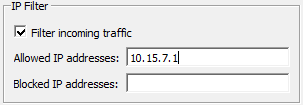
Define either allowed IP addresses or blocked IP addresses; not both.